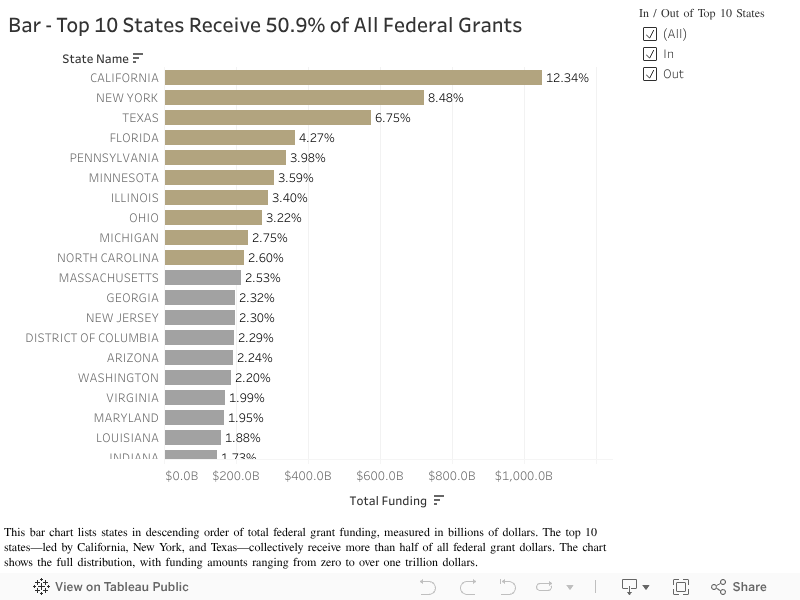
A) Funding by State (USAspending)
What you are seeing: Total obligation amounts aggregated by recipient state.
Why it matters: Helps spot geographic concentration and quickly identify the biggest funding destinations.
Federal agencies obligate trillions in grants and loans annually. Independent audits provide crucial oversight signals about how these funds are managed.
"Follow the Money. Trust the Recipient."
Financial assistance obligations tracked in our dataset for recent fiscal years.
Source: USAspending.govSingle audit reports filed by non-federal entities receiving significant funding.
Source: Federal Audit ClearinghouseWe link Spending, Audits, and Exclusions to show the full oversight picture.
Source: Project PipelineA 0–100 score that summarizes audit risk signals into an easy-to-read tier.
Current Dataset Snapshot:
Red (High Risk): ~9,976 entities (avg TPS 17.43)
Yellow (Watch List): ~22,202 entities (avg TPS 68.35)
Green (Trusted): ~10,044 entities (avg TPS 85.48)
Adjust risk points to see how the score changes.
80Lower oversight signals. Good standing based on current audit data.
Ready to see real data?
Use TPS to decide where to look, then use dashboards to understand why.
Explore Dashboards ↓Interactive Tableau dashboards built from USAspending.gov and Federal Audit Clearinghouse (FAC), organized around TPS tiers and oversight signals.
What you are seeing: Total obligation amounts aggregated by recipient state.
Why it matters: Helps spot geographic concentration and quickly identify the biggest funding destinations.
What you are seeing: Trends in obligations across recent fiscal years.
Why it matters: Reveals spikes (for example, pandemic relief) or shifts in funding priorities.
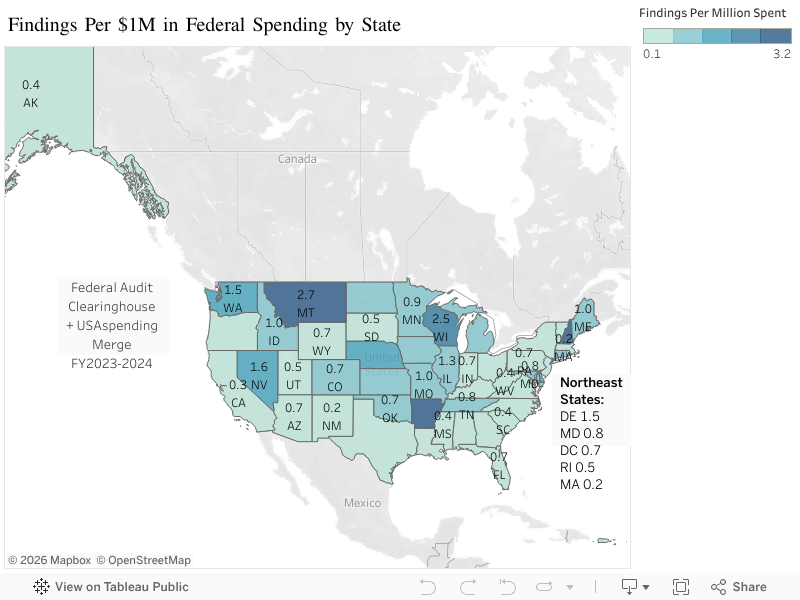
What you are seeing: Aggregated audit findings patterns from Federal Audit Clearinghouse data.
Why it matters: Highlights entities or geographies with elevated oversight signals.
What you are seeing: A combined view that contextualizes oversight signals with funding and recipient information.
Why it matters: Supports guided analysis and case-study drill downs.
We combine three official datasets to build this view. Understanding what each system tracks—and misses—is critical for analysis.
The central repository for single audit reports filed by recipients of federal funds.
Pitfall: Reporting lags by 9 months or more.
Go to FACThe official open data source of federal spending information.
Pitfall: 'Obligation' is not the same as cash outlay.
Go to USAspending API DocsThe primary database for entity registration and debarments (exclusions).
Pitfall: Exclusions data often lacks UEI fields.
Exclusions API
We use the Unique Entity ID (UEI) to join FAC audits with USAspending records.
Limitation: Since SAM exclusions often lack a structured UEI, matching debarred entities to spending requires fuzzy logic and is not 100% exact.
Government data is complex. Use this glossary to understand key terms like "Material Weakness" or "Obligation."
We aggregate data from three official government systems to create a unified view of funding and oversight.
Taxpayer Protection Score (TPS) is an interpretability layer we generate. We compute it by capping risk points (derived from audit findings and funding context) at 100, then subtracting from 100.
Formula: TPS = 100 - min(risk_points, 100)
Guided examples of how to interpret the dashboards and spot oversight signals.
An entity or state shows a sharp increase in funding over a short window. Start by checking the TPS tier—is it Red or Yellow?
An entity appears on the SAM exclusions list (name/UEI match) but still shows awards. This typically flags a "Red" tier risk.
A recipient shows similar audit findings across multiple years. This lowers the TPS because it indicates systemic issues.
How to use this information responsibly to ask better questions.
Everything here is traceable to official sources or reproducible repo artifacts.
Direct access to our reproducible data products on GitHub.